

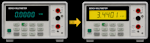
Video Blog 175 - HP3457A Multimeter TFT Conversion
- Details
- Published: Thursday, 05 February 2026
- Hits: 1026
DISCLAIMER: This video is educational only, so if you decide to do the same yourself then you are on your own, I can't be held responsible for any problems/issues/damage/injury that may occur if you decide to follow this blog and try it yourself.
VIDEO BLOG
Off the back of my recent ADCMT SMU TFT conversion I thought i'd take a look at trying to do the same on my 3457A.
The PCB gerbers, BOM & instructions - https://www.ianjohnston.com/misc/3457A_TFT_Conversion.zip
Where it all started - https://www.eevblog.com/forum/projects/led-display-for-hp-3457a-multimeter-i-did-it-)/
XI's Protocol post - https://www.eevblog.com/forum/projects/led-display-for-hp-3457a-multimeter-i-did-it-)/msg1347268/#msg1347268
GIT source - https://www.ianjohnston.com/index.php/videos/video-blog-175-3457a
YouTube Video:
Programming the BluePill board:
Use an STLink V2 or V3 programmer, clone's should work.
Leave the Boot0 & Boot1 headers as default.
The following can be done with the BluePill in-place and my Pcb connected to the meter,
otherwise you will need +5v power to the BluePill board if doing standalone.
Connect using the SWD connector (the USB connector is not used):
SWDIO -> SWDIO
SWCLK -> SWCLK
GND -> GND
3.3V -> 3.3V (VREF)
NRST -> NRST
Method 1:
Open STM32 ST-LINK Utility
Target -> Connect
File -> Open File
Select .hex file
Target -> Program & Verify
Click Start
Method 2:
Open STM32CubeProgrammer
Select:
ST-LINK
Port = SWD
Click Connect
Open File
Select .hex file
Click Download
