

Article 005 - 3458A DMM Conversion of Dallas Non-Volatile Ram to FRAM
- Details
- Published: Thursday, 11 June 2026
- Hits: 1514
3458A DMM conversion of Dallas Non-Volatile Ram to FRAM
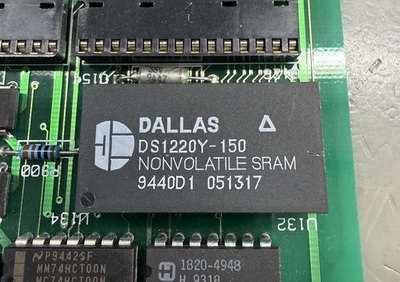
Owners of the HP/Agilent/Keysight 3458A 8.5-digit multimeter should be aware that these instruments contain an expensive ticking time bomb.
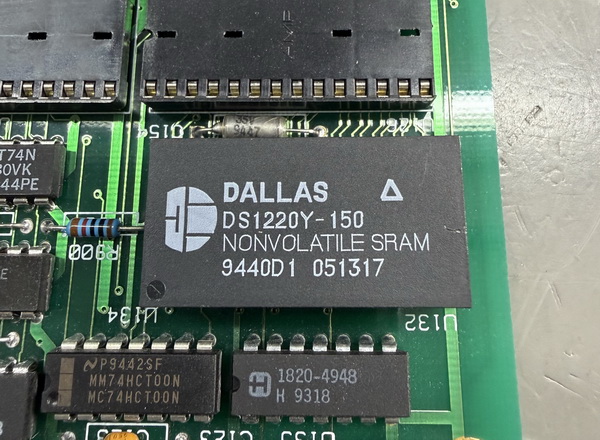
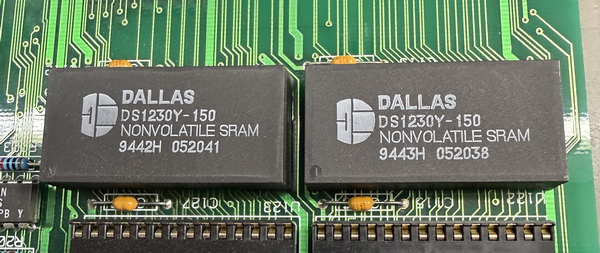
Many older versions of the 3458A use battery-backed non-volatile SRAM devices to retain both the instrument calibration data and the user configuration settings. These are Dallas Semiconductor memory devices: the DS1220Y for the calibration RAM (nicknamed the CalRAM) and the DS1230Y for the settings RAM.
Once these devices reach 10 years of age or more, they can become susceptible to failure and data loss. The most serious issue is the loss of the 3458A calibration data. If this happens, replacing the memory device alone is not enough — the instrument will require a full recalibration, which can easily cost thousands.
Fortunately, one of the best preventative upgrades you can make to a 3458A is to replace the original Dallas non-volatile SRAM devices with modern FRAM (Ferroelectric RAM) replacements.
FRAM devices offer major advantages over the original battery-backed SRAMs. They require no internal battery, have extremely high endurance, and offer data retention measured in decades — typically around 150 years. Once fitted, a FRAM upgrade should easily outlast not only the original memory devices, but quite possibly the remaining lifetime of the instrument itself.
My 3458A FRAM short:
https://youtube.com/shorts/Vz6c6m86O4c?si=zi_j1NHDUkv3_tdJ
FRAM Compatibility
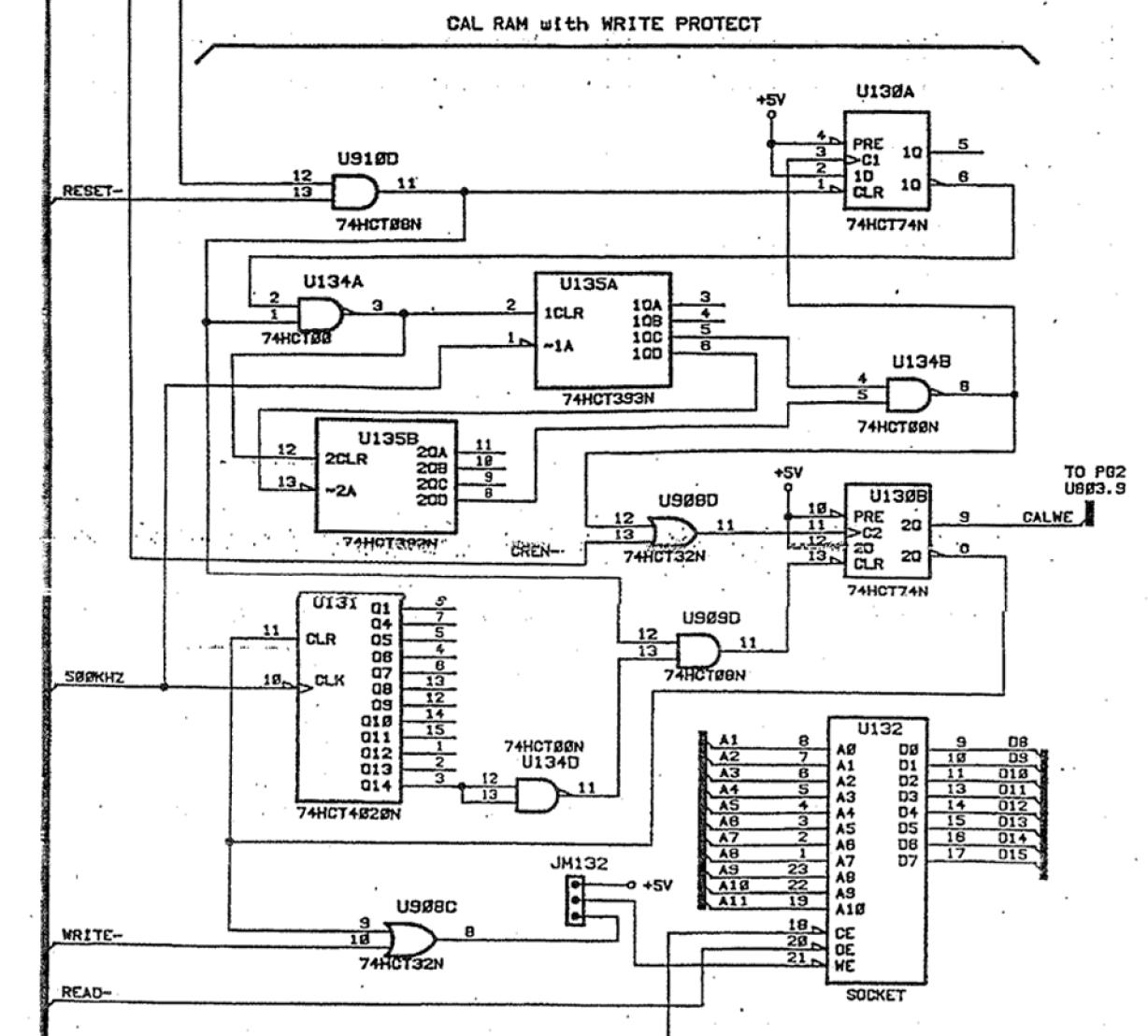 Although the FM16W08/FM18W08 FRAM devices are not electrically identical to conventional SRAM devices, examination of the 3458A memory interface circuitry shows that the instrument appears highly compatible with FRAM operation (see the FRAM datasheets). Unlike some simpler SRAM systems where the chip enable (CE) line may be permanently asserted, the 3458A actively decodes and controls the RAM chip-enable lines through dedicated address decode logic. This is important because the FRAM devices require proper CE strobbing during memory accesses in order to latch addresses correctly.
The 3458A memory subsystem also incorporates address latching, pull-up resistor networks and dedicated write-protection circuitry around the calibration RAM section. These design features provide controlled memory access and help protect against corruption during power transitions. In practical long-term use, FRAM replacements have proven fully reliable in the 3458A, with calibration storage, settings retention, self-calibration and normal instrument operation all functioning correctly.
Supply voltage compatibility (the 3458A runs at 5V):| FM16W08 | 64K (8K × 8) | 2.7V – 5.5V | SMD |
| FM1608 | 64K (8K × 8) | 4.5V – 5.5V | DIP |
| FM18W08 | 256K (32K × 8) | 2.7V – 5.5V | SMD |
| FM1808 | 256K (32K × 8) | 4.5V – 5.5V | DIP |
PCB Gerber Files
This guide references adaptor boards which I have designed, the gerbers are available for download so you can make your own:
FM1608 Calram DIP adaptor board here.
FM16W08 Calram SMD adaptor board here.
FM16W08 Calram SMD programming adaptor board here.
Note: As well as the Gerbers, some IC sockets and double male, round pin SIL headers are required. The short pin facing downwards: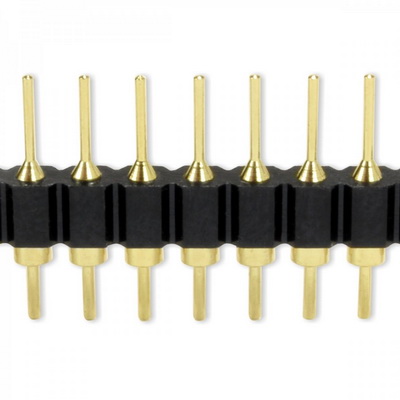
The Dallas Non-Volatile Ram Technology
The Dallas devices are known as NVSRAM (Non-Volatile SRAM).
Internally, they are basically:
- A standard low-power CMOS SRAM chip
- A small sealed lithium battery
- Power-monitoring and protection circuitry
all combined into a single IC package.
Under normal operation, the instrument powers the SRAM like ordinary memory.
When the instrument is switched off, or if the supply voltage drops too low:
- the internal circuitry disconnects the external power
- the internal lithium cell takes over automatically
- the SRAM contents are preserved
The chip also enables write-protection during brownout conditions to prevent corrupted data.
The weakness is the internal lithium battery.
Although Dallas specified around 10 years minimum retention, many instruments are now 20–35 years old.
Once the internal battery voltage drops:
- SRAM contents become unstable
- calibration constants may corrupt
- data can be completely lost
And because the battery is encapsulated inside the epoxy package, it is not intended to be replaced.
This is why these devices are considered a major long-term reliability issue in vintage test equipment.
FRAM - Ferroelectric Ram Technology
FRAM (also called FeRAM or F-RAM) is a completely different technology.
Instead of storing data as electrical charge like SRAM or DRAM, FRAM stores data using a ferroelectric material whose molecular polarization represents binary data.
The important part is:
- no battery is required
- data remains without power
- writes are extremely fast
- endurance is enormous
FRAM devices can typically withstand between 10 trillion and 1 quadrillion write cycles, vastly higher than Flash memory.
Getting your data from the existing Dallas Non-Volatile Ram
Option 1:
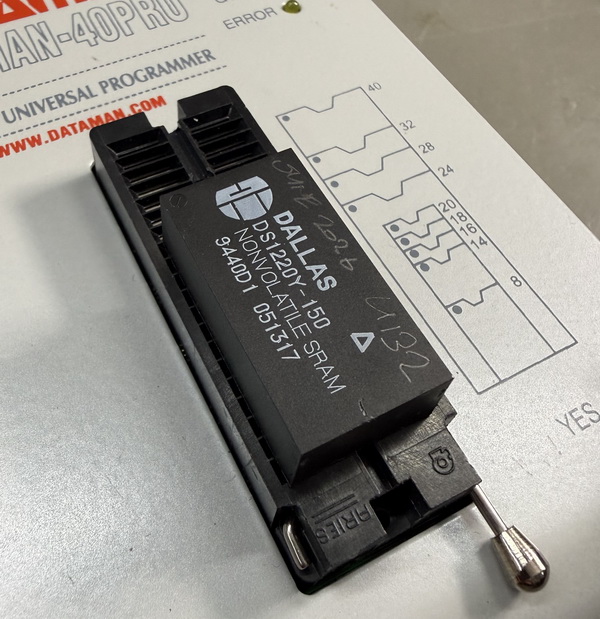
Carefully desolder the Dallas Ram ICs from the 3458A Pcb and read the data onto a file on your PC which you can use later to dump onto the new FRAM IC.
The Calram (calibration ram) data will be a single file (U132).
The Settings data will be two files, one for each existing settings Dallas ram ICs (U121 & U122)
DS1220Y data being read out in the programmer:
Option 2:
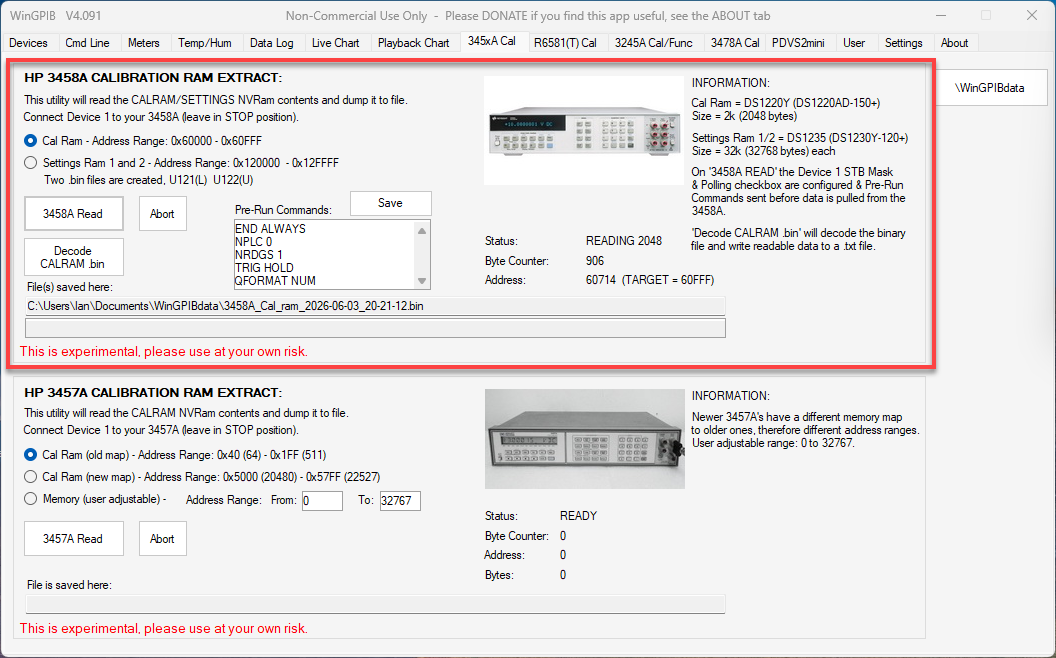
Use WinGPIB to download your data (Calram & Settings x2 ram) onto a file on your PC which you can use later to dump onto the new FRAM IC. Please be advised that WinGPIB is experimental and there is no guarantee your downloaded data files are good.
Even if you opt for Option 1 above, it is highly advisable to use this method as a backup just incase things got wrong when you try to desolder the Dallas rams.
Here's WinGPIB and the 3458A CalRam/Settings Ram download utility:
Here's my own 3458A with the original Dallas ram's fitted. My 3458A is a 1995 unit, and the date code on the Dallas ram's are 1994, some 32 years! So, on acquiring my 3458A just recently, one of the first things I did was carry out a FRAM upgrade.
The DS1220Y Calibration ram upgrade to FRAM
Unfortunately, there is no straight replacement of the DS1220Y for a FRAM IC, so an adaptor board needs to be used.
Dallas DS1220Y - DIL, 16k (2k x 8), 24pin, non-volatile SRAM
Datasheet here.
Option 1:
Ramtron FM1608 - DIL, 64k (8k x 8), 28pin, Ferroelectric non-volatile RAM
Datasheet here.
Through the use of an adaptor board the 28pin Ramtron FM1608 FRAM IC can be made to mimic the Dallas 1220Y IC.
The FM1608 can be programmed with your Calram file, inserted into the adaptor board and then inserted into your 3458A.
The FM1608 Schematic (note A11 & A12 tied to 0V):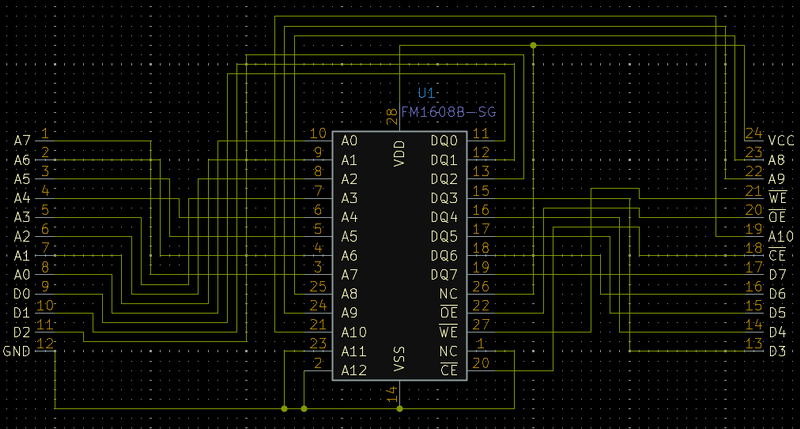
The FM1608 Pcb: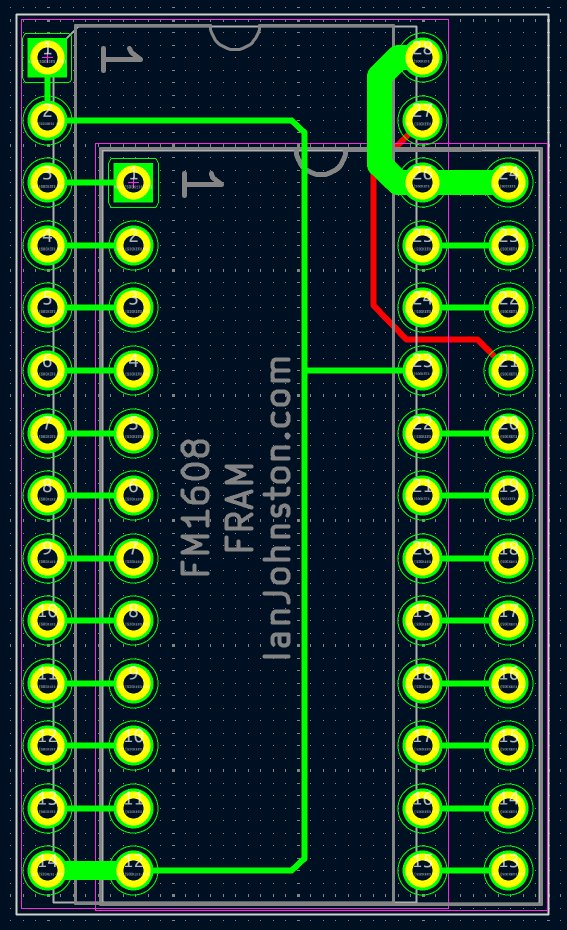
The FM1608, its adaptor board and IC socket. All thats left to add are double male, round pin SIL headers: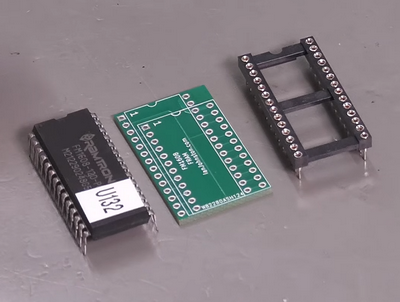
Option 2:
Cypress FM16W08 - SMD, 64k (8k x 8), 28pin, Ferroelectric non-volatile RAM
Datasheet here.
Similarly, the FM16W08 can be programmed with your Calram file, inserted into the adaptor board and then inserted into your 3458A. However, once the IC is soldered to the adaptor board you can no longer program the IC in your programmer unless you have the programming adaptor board. If you don't have that board then you'll need to desolder the FM16W08 from your adaptor board in order to re-program it again.
Why is this? - The FM16W08 is a 28pin SMD IC, whilst the Dallas DS1220Y is a 24-pin IC. Both these IC's are different memory sizes, so the FM16W08 ties the top two address line to 0vdc in order to make the overall package 16k (2k x 8). Not only that but the pinout is different, so once it is adapted then your programmer will not recognise it, the mapping is now different.
My programming adaptor board helps with this by adapting the FM16W08 back to a FM16W08 compatible pinout, albeit still with the top two address lines tied to 0vdc.
So, with the programming adaptor board in use, you can insert it into a programmer, choose FM16W08 as the device and write to the first 16k (2k x 8) of the memory. You must set the top end of your programmer to 07FF.
FM16W08 Quick Guide:
- Plug your FM16W08 on it's board into my adaptor board (your 24pin 16W08 board into the 24pin socket on my adaptor)
- Plug my adaptor board into your programmer (using the 28pin header)
- Set the device to FM16W08 (not Dallas 1220Y.....!)
- Set the end address to 07FF (mega important because the top 2 address lines on the FM16W08 board are tied low)
- Hit Program.....done.
Note: The top 2 address lines are tied low because the FM16W08 is 64kbits (8Kx8), whilst the Dallas 1220Y is only 16kbits (2Kx8).
The FM16W08 Schematic (note A11 & A12 tied to 0V):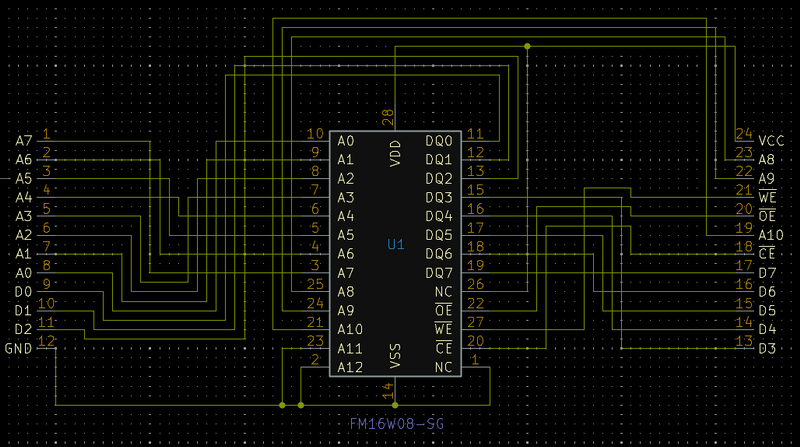
The FM16W08 Pcb: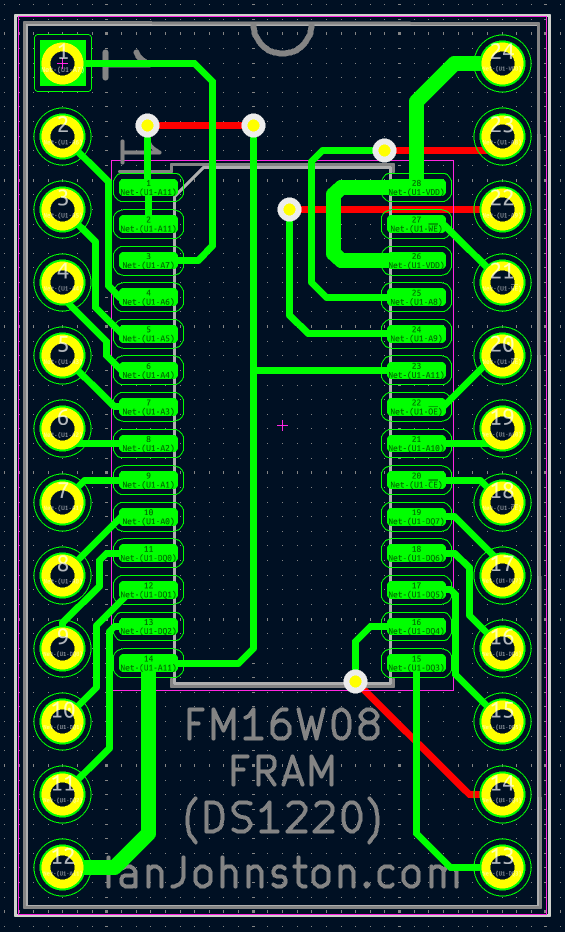
The FM16W08 SMD adaptor board ready for the 3458A. The best type of SIL headers to use are the double male, round pin type: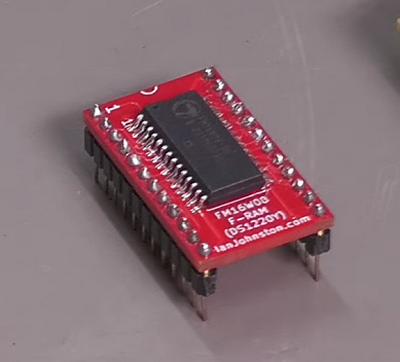
The programming adaptor Pcb (note pin 1 & pin 26 are NC, per the datasheet):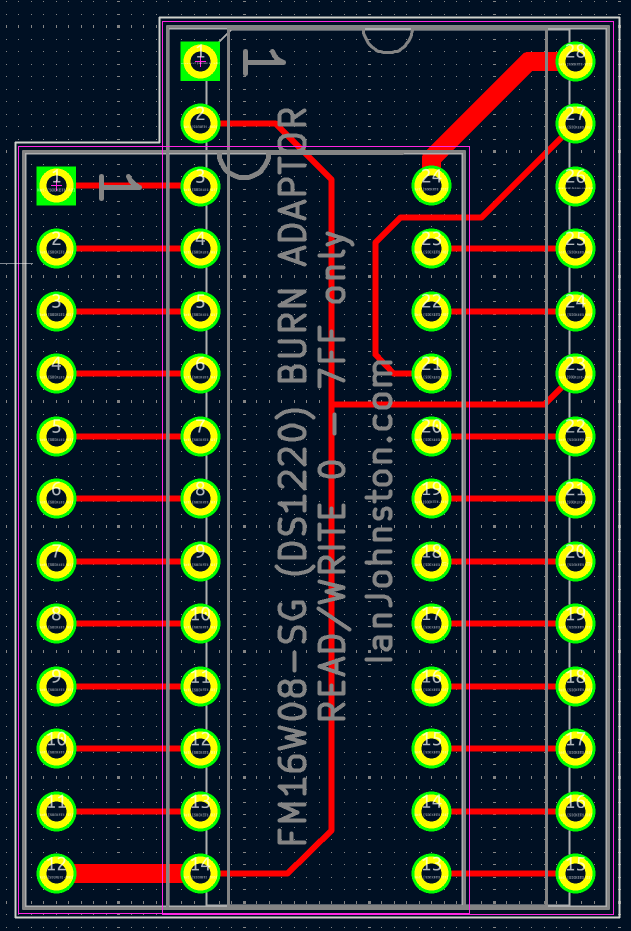
The programming adaptor Pcb, use this if you need to upload your CalRAM data to the SMD FM16W08 IC after it's fitted to your adaptor board. The best type of SIL headers to use are the double male, round pin type:
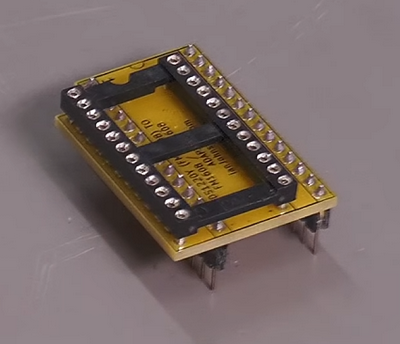
The FM16W08 adaptor board fitted to the programming adaptor board and inserted into my Dataman-40Pro programmer.
Many people make a mistake at this stage and claim the programming adaptor board doesn't work. My investigations each time has always proved they made a mistake because they didn't understand its usage, so please pay attention to my guide: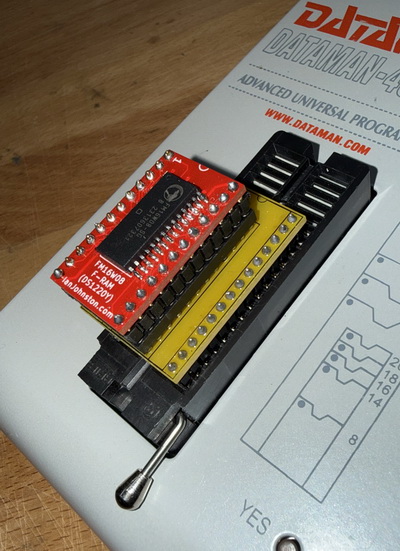
Successful programming of the FM16W08 using the programming adaptor, note pointers = 07FF and the device type Cypress FM16W08:
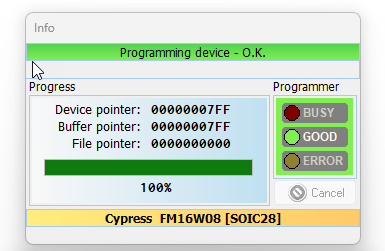
The DS1230Y Settings ram upgrade to FRAM
Fortunately, there is a FRAM IC that is pin compatible with the original Dallas DS1230Y ram IC.
Dallas DS1230Y - DIL, 256k (32k x 8), 28pin, non-volatile SRAM.
Datasheet here.
Option 1:
Ramtron FM1808 - DIL, 256k (32k x 8), 28pin, Ferroelectric non-volatile RAM
Datasheet here.
Straight compatibility of the original Dallas DS1230Y to the FM1808 IC.
Option 2:
Cypress FM18W08 - SMD, 256k (32k x 8), 28pin, Ferroelectric non-volatile RAM
Datasheet here.
Compatibility through the use of a 28pin SOIC SMD to 28pin DIL adaptor (Ebay, Amazon etc).
The FM18W08 SMD version on a SOIC28 to DIP28 adaptor, and just awaiting double male, round pin type SIL headers to fit: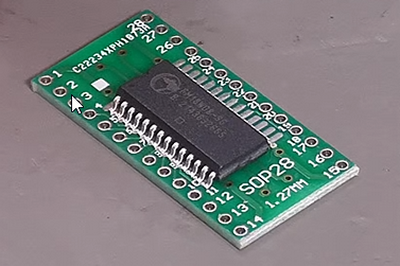
DIP versions fitted to my current 3458A :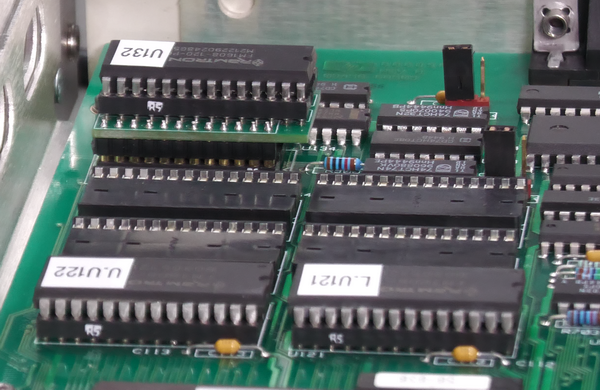 Collection of both DIP and SMD versions: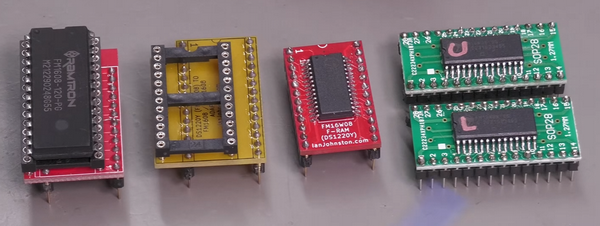
SMD versions of the settings rams in my previous 3458A: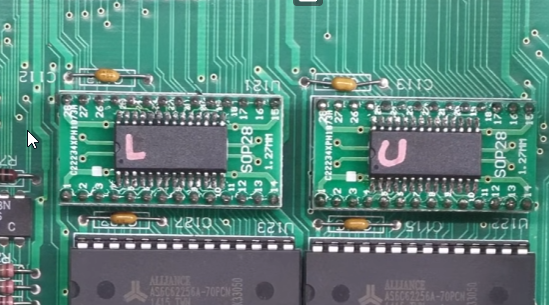
Final Thoughts
With the FRAM ICs installed, your 3458A remains fully calibratable, as the replacement devices are completely read/write compatible with the original memory devices used by the instrument.
Don't wait for the original Dallas devices to fail — upgrading the non-volatile RAM in your 3458A is highly recommended and should be considered essential preventative maintenance for any serious owner of these instruments.
The mathematics of the situation are stark. If your 3458A was manufactured in the late 1980s or early 1990s, the Dallas devices inside it are now well over 30 years old — three times their minimum rated battery life. Every day you continue to use the instrument with the original NVSRAM fitted is a gamble, and the consequences of losing your calibration data are far from trivial. A full factory recalibration of the 3458A requires specialist equipment and expertise, and can cost significantly more than the instrument itself is worth on the secondhand market. By contrast, the FRAM devices themselves are inexpensive and the upgrade, while requiring care, is entirely within reach of any competent hobbyist or technician.
It is also worth emphasising that the upgrade is not merely a like-for-like swap — it is a genuine improvement in every measurable respect. FRAM requires no battery whatsoever, eliminating the original single point of failure entirely. Its data retention is rated at around 150 years under normal conditions, its write endurance vastly exceeds anything the original devices could offer, and there is no degradation mechanism comparable to a slowly flattening lithium cell. The FRAM devices will simply continue to work, indefinitely, without intervention.
**Always back up your data first.** Before touching anything inside the instrument, use WinGPIB or a similar GPIB utility to download your CalRAM and Settings RAM data to files on your PC. Desoldering aged Dallas devices carries risk — they are brittle, the PCB pads are decades old, and there is always a chance something goes wrong. Having a verified backup means that even in a worst-case scenario, you are not starting from zero.
Finally, it is worth noting that the 3458A is not the only vintage instrument affected by this issue. The same Dallas NVSRAM devices — or close relatives — appear in a wide range of HP, Agilent, Tektronix and other test equipment from the same era. If you own other instruments from this period, it is worth investigating whether they too carry aging battery-backed memory. The FRAM upgrade approach described here, and the general principles behind it, are broadly applicable across this class of equipment.
The 3458A is one of the finest metrology-grade multimeters ever made. With a little care and a modest investment, there is no reason it should not continue to perform at the highest level for decades to come — and the FRAM upgrade is one of the most worthwhile steps you can take toward that goal.
