

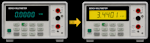
Video Blog 173 & 174 - ADCMT 6243 Source Measure Unit TFT LCD Upgrade Parts 1&2
- Details
- Published: Tuesday, 20 January 2026
- Hits: 2049
DISCLAIMER: This video is educational only, so if you decide to do the same yourself then you are on your own, I can't be held responsible for any problems/issues/damage/injury that may occur if you decide to follow this blog and try it yourself.
VIDEO BLOG
I bought a 6243 SMU in the hope I could retrofit my R6581T TFT upgrade to it!
Files:
GIT .HEX file (latest) = https://github.com/Ian-Johnston/R6243_VS_Display/tree/master/VisualGDB/Debug
Gerbers, instructions, photos etc. = https://www.ianjohnston.com/misc/ADCMT_6243_4.zip
GIT source = https://github.com/Ian-Johnston/R6243_VS_Display
Update 07/07/26:
Hex file updated - Fixed bug related to sending data to the LT7680 Pcb. Also, added speed test at boot to check for fake/slow BluePill boards.
YouTube Video:
